Running Local LLMs on Consumer Hardware: A Practical Guide
Introduction
Large language models are typically associated with massive GPU clusters and enterprise budgets. But what if you could run 27B and 35B parameter models on a 5-year-old consumer PC? This is the story of how I built a local LLM inference server on aging hardware, overcoming VRAM limits, bandwidth bottlenecks, and power constraints.
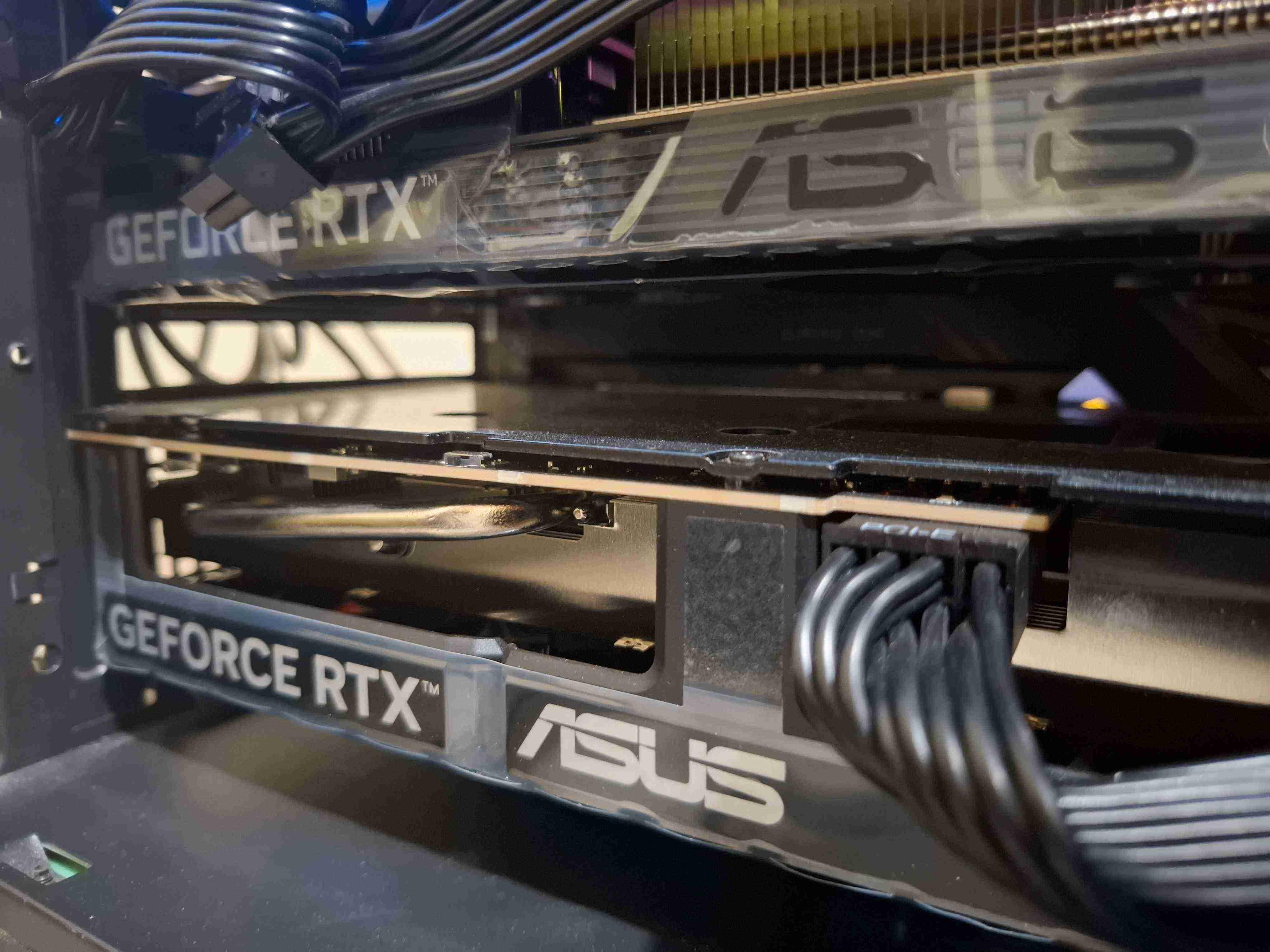
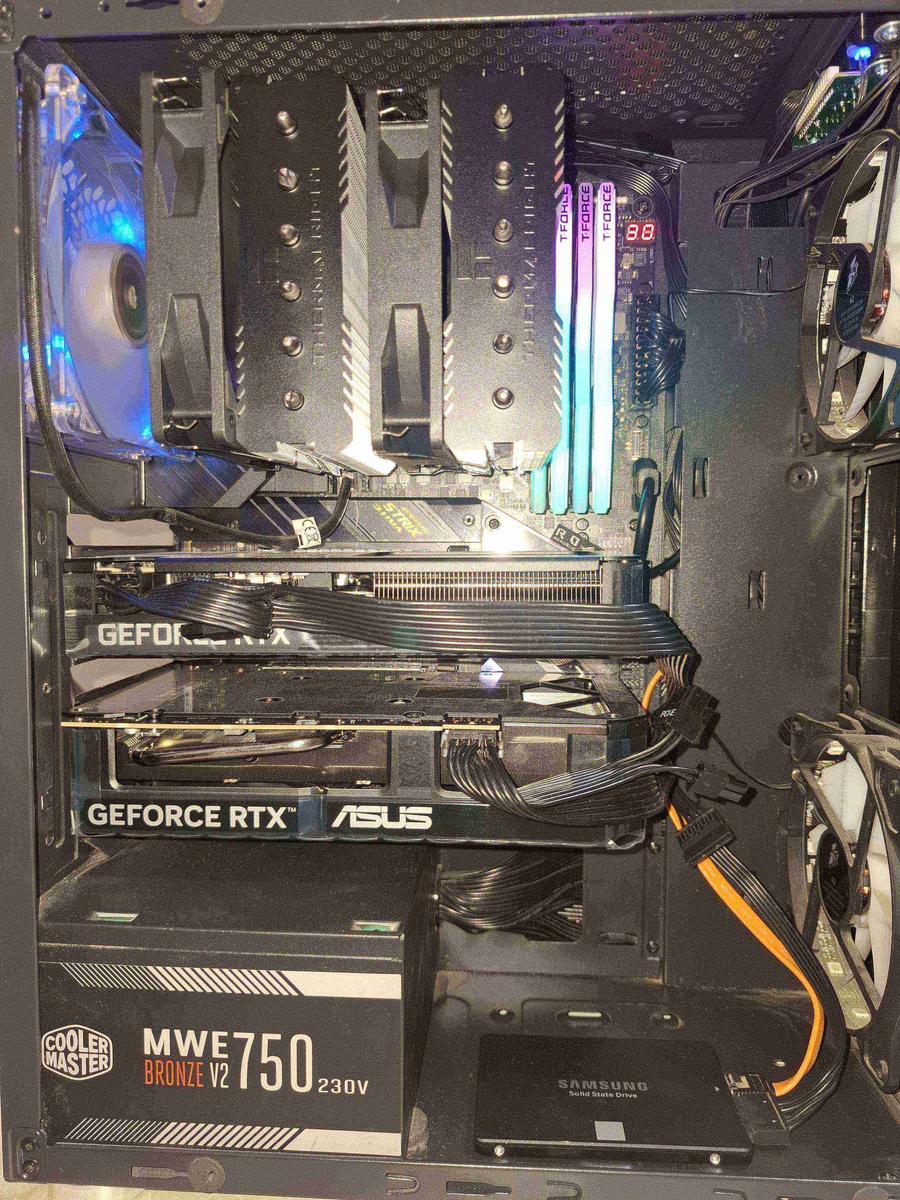
My setup: an Intel i7-11700K, 32GB DDR4-3200, Z590 motherboard with two PCIe x8 lanes direct to CPU, dual RTX 5060 Ti 16GB (32GB VRAM total, 880 GB/s combined throughput), and a 750W PSU. This desktop AI rig is named "Normandy" and runs llama.cpp compiled from source with CUDA support.
| Component | Specification |
|---|---|
| CPU | Intel i7-11700K (~125W TDP) |
| RAM | 32GB DDR4-3200 (128bit) |
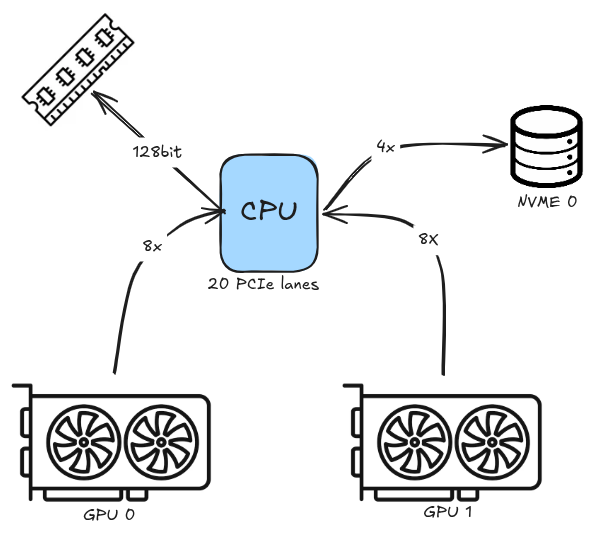
| Motherboard | Z590 (DMI 3.0 x4 to chipset, 20 PCIe lanes from CPU) |
| GPU 0 | RTX 5060 Ti 16GB (440 GB/s, 8x PCIe) |
| GPU 1 | RTX 5060 Ti 16GB (440 GB/s, 8x PCIe) |
| Total VRAM | 32GB (880 GB/s combined, tensor split) |
| PSU | 750W (~650W under full GPU+CPU load, ~80W idle) |
| Network | LAN (192.168.18.200) |
| Name | Normandy |
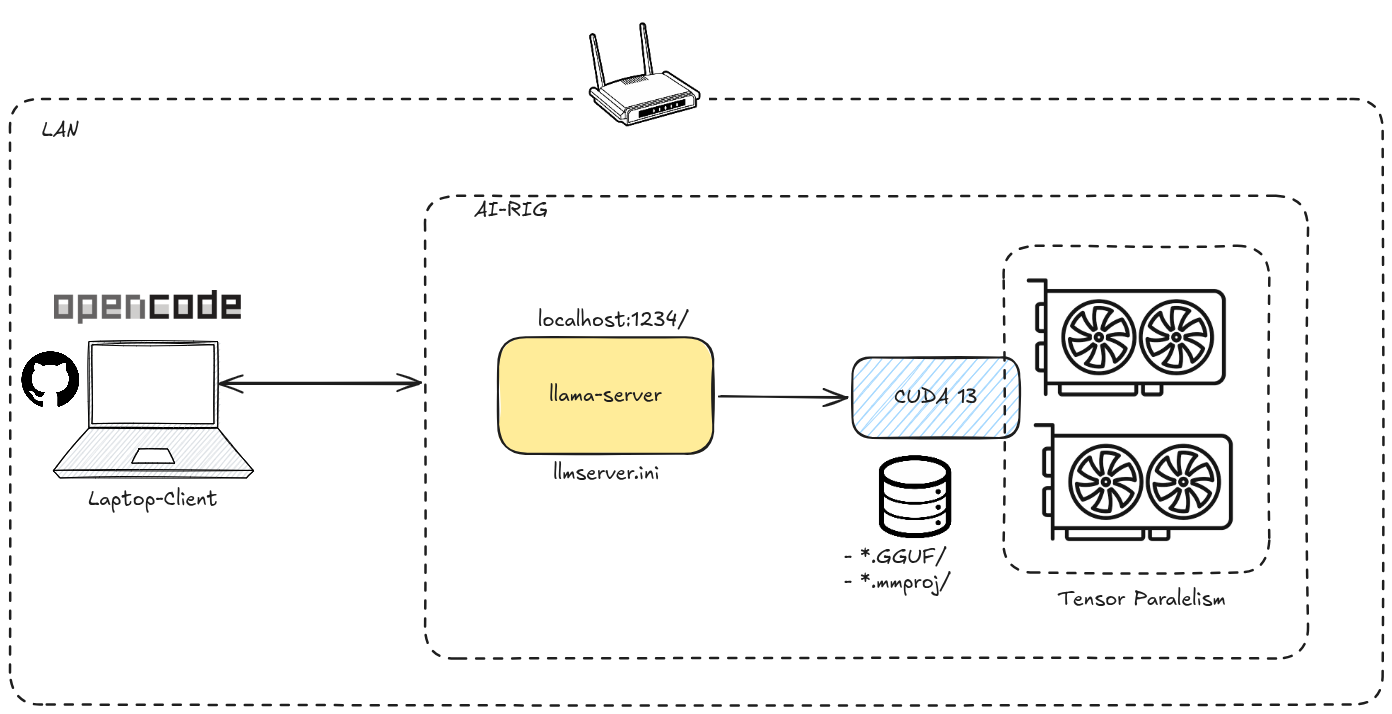
Before diving in, here's the architecture of my setup:
Goal
Run state-of-the-art open-weight LLMs (27B–35B parameters) entirely on local consumer hardware, with acceptable inference speeds, vision capabilities, and long context windows without ever spilling over into system RAM.
The Hardware Realities
1. Memory is the First Wall
A 27B model in Q4 quantized format needs roughly 15–16 GB of VRAM just for the weights. With 32 GB across two GPUs, I can fit the entire model on one card and dedicate the second GPU's VRAM entirely to the KV cache. This unlocks 100K+ context windows without breaking a sweat.
2. Throughput Matters More Than You Think
Each RTX 5060 Ti delivers 440 GB/s of memory bandwidth. With tensor split across both cards, layer computation is parallelized. I benchmarked every model using llama-benchy (more on that later) and the real numbers speak for themselves: a 27B dense model like Qwen3.6-27B generates 40.78 tok/s, while a 35B-A3B MoE model like Qwopus3.6-35B-A3B hits 150.09 tok/s. That's the MoE advantage: activating only 3.5B parameters per token despite having 35B total.
3. Power is a Real Constraint
A 750W PSU with dual GPUs is tight. The i7-11700K draws ~125W under load, and each RTX 5060 Ti peaks at ~200W during inference. That's 525W for CPU + GPUs alone, plus motherboard, drives, and fans, totaling ~650W under full load. I'm within spec but there's no headroom for overclocking. The system idles at ~80W.
4. Bypassing the Motherboard Chipset Tax
The Z590 has a DMI 3.0 x4 link to the chipset, which is a bottleneck. By placing both GPUs in the CPU-attached PCIe slots (x8/x8 direct to CPU), I avoid chipset overhead entirely. This is critical for dual-GPU setups: chipset lanes would create a severe bottleneck for tensor-parallel inference, where both GPUs communicate constantly. Direct CPU lanes shave off ~5-10% latency on prompt processing and keep inter-GPU sync fast.
The Software Stack
5. Model Configuration in llama.cpp
Every model gets its own [section] in the llama.cpp configuration file. Here's the anatomy of an entry:
[Qwen3.6-27B]
model = /path/to/Qwen3.6-27B-Q4_K_M.gguf
mmproj = /path/to/mmproj-Qwen3.6-27B-BF16.gguf
kv-unified = true
no-mmap = true
flash-attn = true
cache-type-k = q8_0
cache-type-v = q8_0
ctx-size = 100000
threads = -1
split-mode = tensor
ngl = 99
6. Multimodality with mmproj Files
Vision models require a multimodal projector file (mmproj) that maps image embeddings into the language model's token space. Without it, the model is text-only. The mmproj file must match the base model's architecture.
7. Context Length: Stretching the Limit
Default context sizes are often 8K–32K tokens. By setting ctx-size = 100000 (100K tokens), I enable processing of large documents. But longer contexts eat VRAM quadratically; that's where KV cache quantization comes in.
8. MTP (Multi-Token Prediction) on Qwen Models
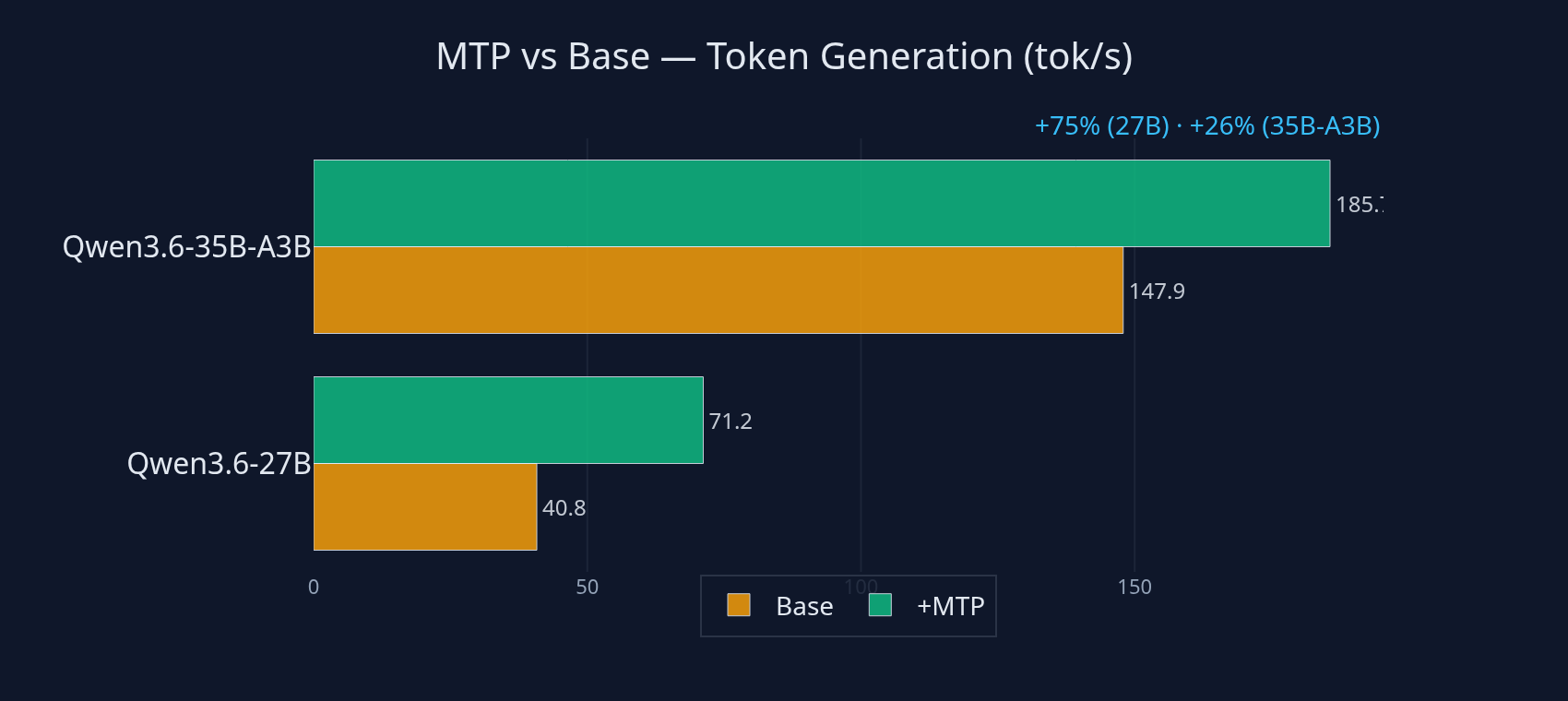
MTP enables draft-model speculative decoding. A small draft model proposes multiple tokens, and the main model verifies them in a single forward pass. With spec-type = draft-mtp and spec-draft-n-max = 2, the benchmarks confirm the speedup: Qwen3.6-27B goes from 40.78 tok/s to 71.19 tok/s (1.75x), and Qwen3.6_mtp-35B-A3B goes from 147.91 tok/s to 185.69 tok/s (1.25x). The draft model is baked into the same GGUF file, so no separate download is needed.
[Qwen3.6_mtp-27B]
spec-type = draft-mtp
spec-draft-n-max = 2
9. Uncensored Models
Models like Qwen3.6-27B-Heretic-Uncensored-FINETUNE remove alignment restrictions. These are useful for unrestricted creative writing, roleplay, or code generation where safety filters would otherwise refuse legitimate prompts. Trade-off: they can produce more unpredictable outputs.
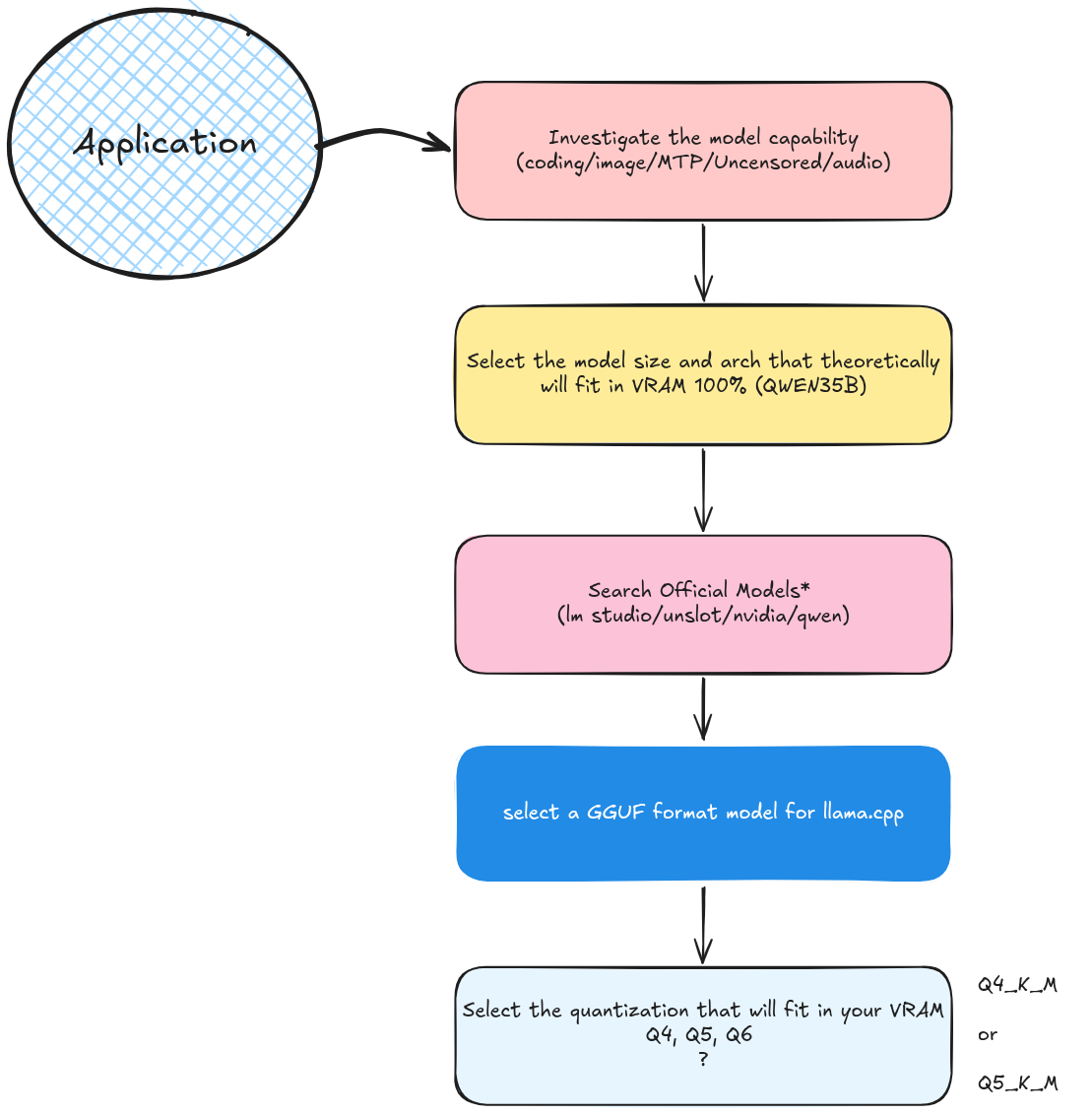
10. Finding the Right Model on Hugging Face
The search space is massive. My criteria:
- GGUF format (llama.cpp compatible)
- Quantization: Q4_K_M or Q5_K_S (best quality/size trade-off for 16GB VRAM). See the quantization guide
- MoE architectures (35B-A3B) for high throughput
- Community reputation: check the "Community" tab for benchmarks
Example Hugging Face repo: Qwen3.6-35B-A3B-MTP-GGUF by Unsloth
11. VRAM-Only: Never Spill to System RAM
This is non-negotiable. Once inference spills to system RAM (via --main-gpu or --no-mmap misconfiguration), token generation speed drops from 15 tok/s to <1 tok/s. The ngl = 99 flag ensures all layers fit in GPU memory. If the model doesn't fit, choose a smaller quant or a smaller model.
12. Flash Attention
Flash attention recomputes attention matrices on-the-fly instead of storing them, reducing VRAM usage from O(n²) to O(n). With flash-attn = true, a 100K context fits comfortably even on a single GPU. On dual GPUs, it frees up VRAM for even larger contexts or higher batch sizes. Without flash attention, that same 100K context would eat ~32GB of VRAM.
13. KV Cache Quantization
The KV cache grows linearly with context length. A 100K context at FP16 requires ~4GB for the KV cache alone. By setting cache-type-k = q8_0 and cache-type-v = q8_0, I compress it to 8-bit, halving the memory footprint. The quality impact is negligible for most use cases.
14. Split Mode: Tensor vs Layer
All my configs use split-mode = tensor as the primary mode. Here's why:
split-mode = tensor: Splits individual tensor operations across both GPUs. Both GPUs work on the same layer simultaneously, each handling half the tensor. This doubles prompt processing (PP) and token generation (TG) throughput compared to layer mode.split-mode = layer: Distributes complete layers across GPUs. Even memory distribution, but each GPU processes sequentially: one GPU is idle while the other computes.
The trade-off: tensor mode draws more power since both GPUs are active at full load, and inter-GPU communication over PCIe adds overhead. But for inference throughput, tensor is strictly better.
15. KV Unification
kv-unified = true enables a shared KV cache for batched sequences. Instead of allocating separate KV caches per sequence, the model uses a unified pool. This reduces fragmentation and improves memory utilization, especially when running multiple concurrent requests.
16. llama.cpp vs vLLM: A Trade-off
| Feature | llama.cpp | vLLM |
|---|---|---|
| Hardware | Consumer GPUs (4–48GB, multi-GPU) | Enterprise (A100/H100, 80GB+) |
| Concurrency | Single-threaded (no batching) | PagedAttention, continuous batching |
| Setup | Single binary, no dependencies | Python, CUDA deps, complex setup |
| Quantization | GGUF (native) | AWQ/GPTQ (via external tools) |
llama.cpp cannot scale: it has no concurrent request batching. But it runs perfectly on consumer hardware. vLLM requires enterprise GPUs and doesn't support GGUF. For a home server serving one user (me), llama.cpp is ideal. See the llama.cpp repository for source.
Benchmarking with llama-benchy
All the numbers in this post come from real benchmarks, not estimates. I use llama-benchy, a CLI benchmarking tool for OpenAI-compatible inference endpoints. It measures prompt processing (PP) and text generation (TG) throughput under controlled conditions.
Methodology
Every model was tested with the same parameters:
- Prompt processing: 1000 tokens (
--pp 1000) - Text generation: 256 tokens (
--tg 256) - Concurrency: 1 (
--c 1): single request, no batching - Endpoint: llama.cpp server at
http://192.168.18.200:1234/v1 - Runs: 3 per model, results reported as mean ± stddev
- Coherence test: Passed for all models (output quality verified)
The exact command used for each model:
uvx llama-benchy --base-url http://192.168.18.200:1234/v1 \
  --model <model-name> --pp 1000 --tg 256 --c 1
Results
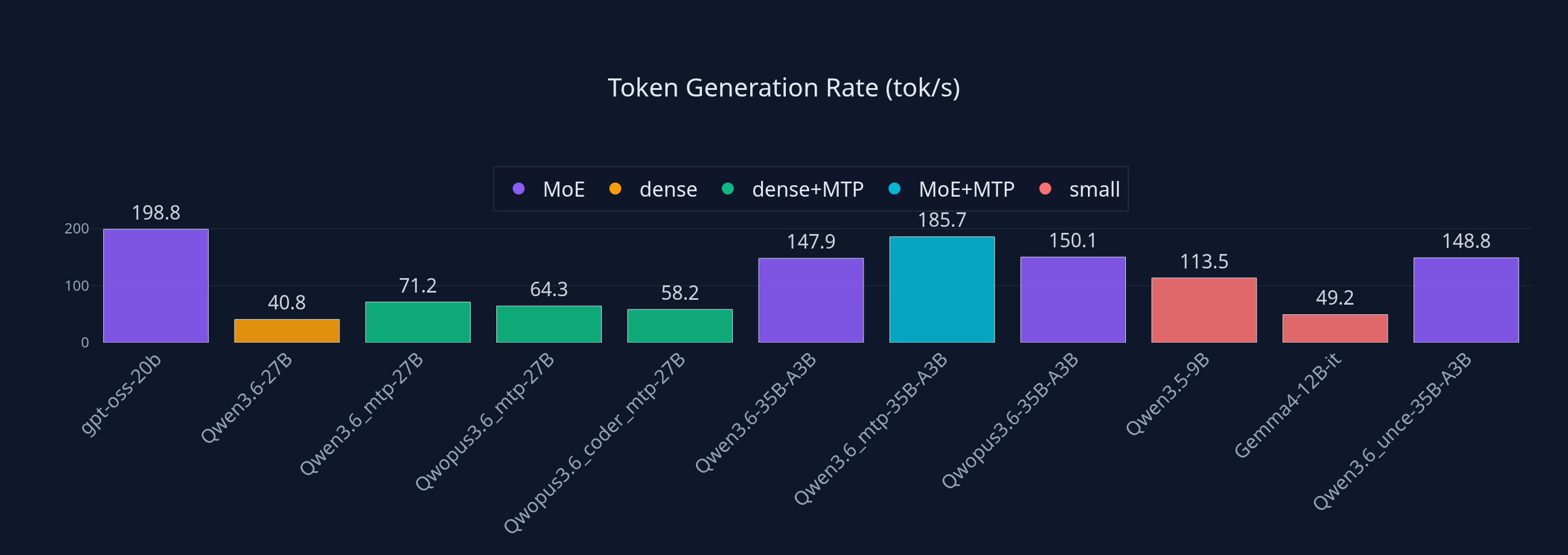
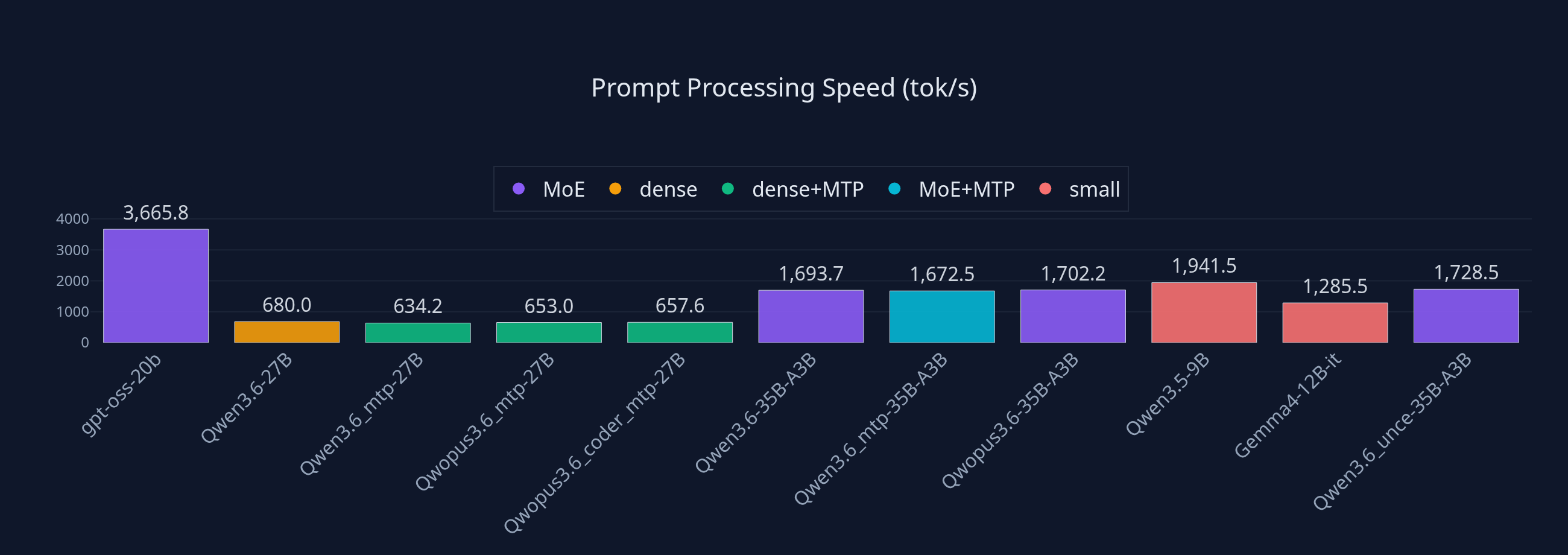
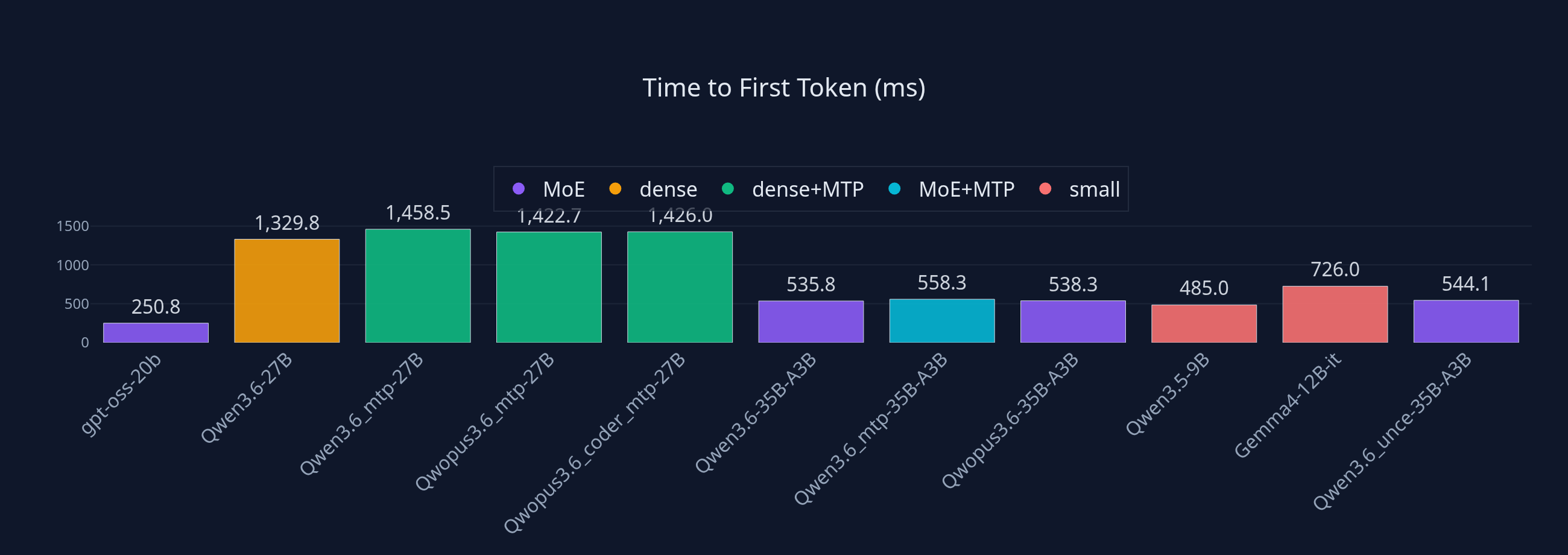
| Model | PP (tok/s) | TG (tok/s) | TTFR (ms) | Notes |
|---|---|---|---|---|
| gpt-oss-20b | 3665.84 | 198.84 | 250.83 | Fastest overall (20B MoE) |
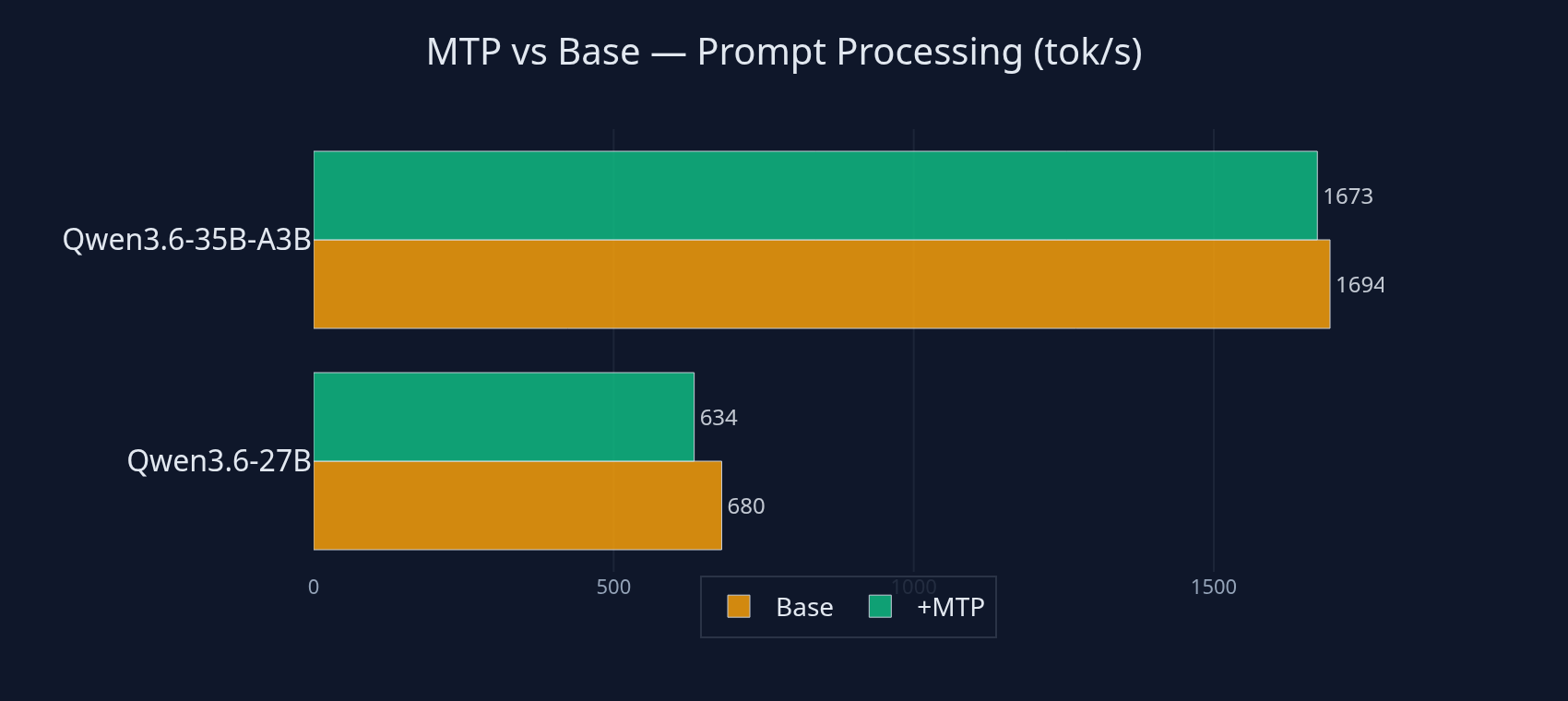
| Qwen3.6-27B | 680.01 | 40.78 | 1329.76 | Vision, reasoning |
| Qwen3.6_mtp-27B | 634.18 | 71.19 | 1458.45 | Fast reasoning (MTP) |
| Qwopus3.6_mtp-27B | 652.95 | 64.31 | 1422.65 | Fast reasoning (MTP) |
| Qwopus3.6_coder_mtp-27B | 657.57 | 58.23 | 1426.01 | Coding (MTP) |
| Qwen3.6-35B-A3B | 1693.65 | 147.91 | 535.80 | Fast MoE, high throughput |
| Qwen3.6_mtp-35B-A3B | 1672.54 | 185.69 | 558.30 | Fastest MoE + MTP |
| Qwopus3.6-35B-A3B | 1702.16 | 150.09 | 538.33 | Fast MoE variant |
| Qwen3.5-9B | 1941.48 | 113.45 | 485.04 | Quick tasks, agents |
| Gemma4-12B-it | 1285.54 | 49.24 | 726.00 | Multimodal (audio + vision) |
| Qwen3.6_unce-35B-A3B | 1728.45 | 148.81 | 544.07 | Uncensored MoE |
Gemma4-E4B-it failed to load during benchmarking (server error).
MTP Speedup
Comparing MTP models against their base versions shows the real impact of multi-token prediction:
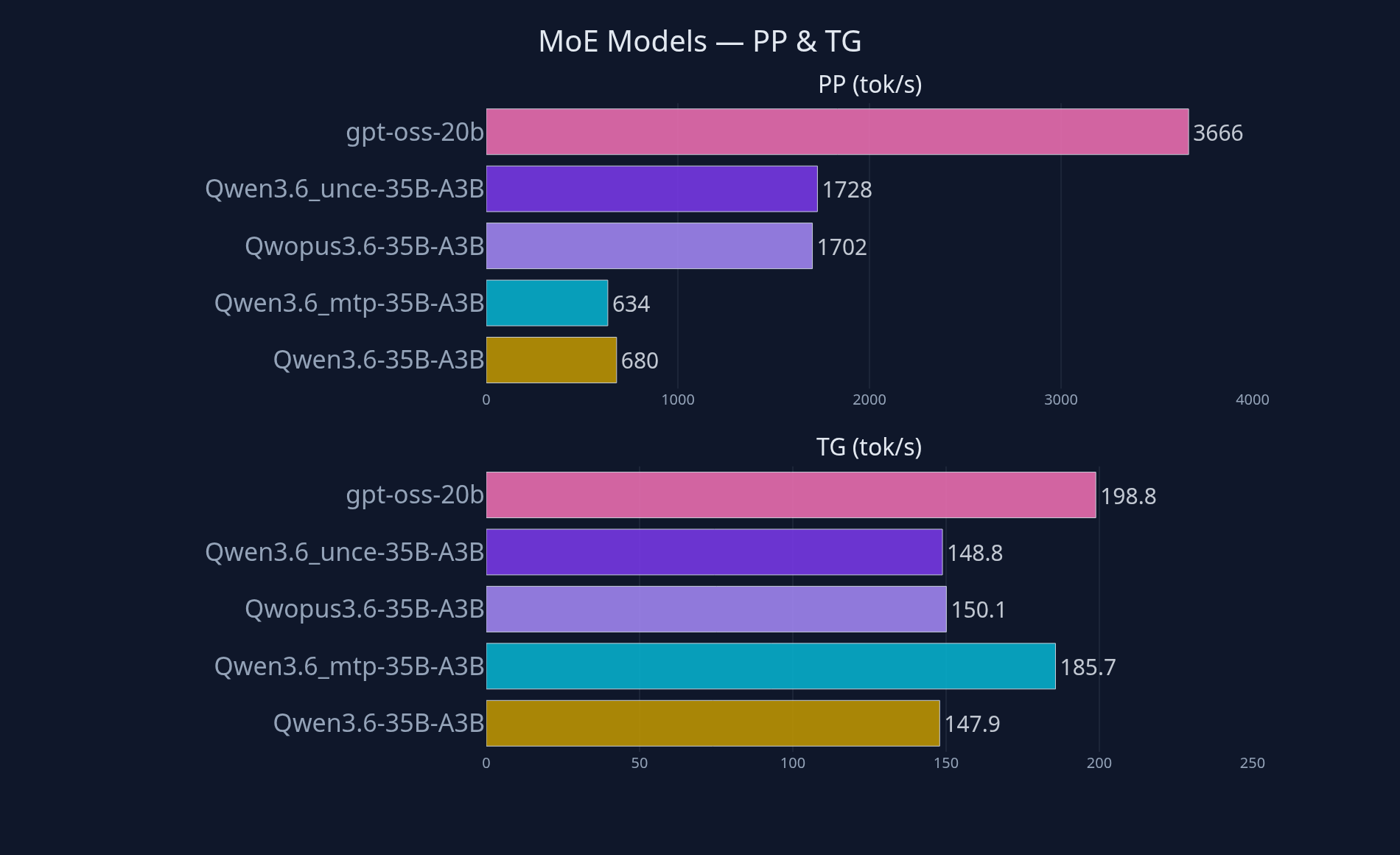
MoE Model Performance
All five MoE models side by side (three 35B-A3B variants, Qwopus, uncensored, plus gpt-oss-20b):
Key Takeaways from the Data
MTP delivers: Qwen3.6_mtp-27B (71.19 tok/s) is 1.75x faster than Qwen3.6-27B (40.78 tok/s). The MTP gain is larger on dense 27B models than on MoE ones, where the draft model's advantage is smaller.
MoE dominates: Every 35B-A3B model beats every dense 27B model. Qwen3.6-35B-A3B (147.91 tok/s) is 3.6x faster than Qwen3.6-27B (40.78 tok/s) despite having more total parameters, because only 3.5B activate per token.
PP speed is a different story: gpt-oss-20b (20B MoE) processes prompts at 3665 tok/s, nearly 2x faster than 35B MoE models. Smaller MoE models dominate prompt processing, and gpt-oss-20b's TG (198.84 tok/s) also beats every 35B-A3B model.
TTFR (Time to First Token): MoE 35B models start responding in ~535-558ms, while dense 27B models take ~1329-1458ms. For interactive use, MoE feels significantly more responsive.
Uncensored vs standard: Qwen3.6_unce-35B-A3B (148.81 tok/s) performs identically to Qwen3.6-35B-A3B (147.91 tok/s): no speed penalty for uncensored variants.
OpenCode Integration
My local server (Normandy, a desktop AI rig at 192.168.18.200:1234) automatically starts llama-server at boot with its .ini configuration. It serves models via an OpenAI-compatible API to clients on the LAN, including my ThinkPad T14 laptop which runs the OpenCode coding agent.
Here's the model configuration used in OpenCode; the pattern is the same for all models:
"models": {
  "gpt-oss-20b": {
    "name": "GPT OSS 20B (normandy)",
    "modalities": { "input": ["image", "text"], "output": ["text"] },
    "variants": {
      "high": { "reasoningEffort": "high" },
      "medium": { "reasoningEffort": "medium" },
      "low": { "reasoningEffort": "low" }
    }
  },
  "Qwen3.6-27B": {
    "name": "Qwen 3.6 27B (normandy)",
    "modalities": { "input": ["image", "text"], "output": ["text"] },
    "variants": {
      "high": { "reasoningEffort": "high" },
      "medium": { "reasoningEffort": "medium" },
      "low": { "reasoningEffort": "low" }
    }
  },
  "Qwen3.6_mtp-27B": {
    "name": "Qwen 3.6 MTP 27B (normandy)",
    "modalities": { "input": ["image", "text"], "output": ["text"] },
    "variants": {
      "high": { "reasoningEffort": "high" },
      "medium": { "reasoningEffort": "medium" },
      "low": { "reasoningEffort": "low" }
    }
  },
  "Qwen3.6-35B-A3B": {
    "name": "Qwen 3.6 35B-A3B (normandy)",
    "modalities": { "input": ["image", "text"], "output": ["text"] },
    "variants": {
      "high": { "reasoningEffort": "high" },
      "medium": { "reasoningEffort": "medium" },
      "low": { "reasoningEffort": "low" }
    }
  },
  "Qwen3.6_mtp-35B-A3B": {
    "name": "Qwen 3.6 MTP 35B-A3B (normandy)",
    "modalities": { "input": ["image", "text"], "output": ["text"] },
    "variants": {
      "high": { "reasoningEffort": "high" },
      "medium": { "reasoningEffort": "medium" },
      "low": { "reasoningEffort": "low" }
    }
  }
}
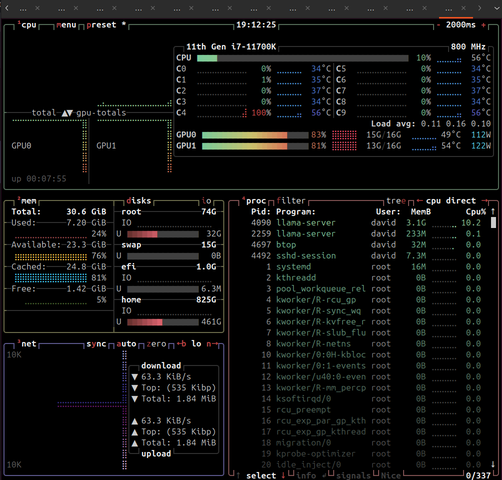
Here's what typical usage looks like: running the Qwen3.6-35B-A3B model with OpenCode at the terminal:
Each model exposes three reasoning effort variants (high, medium, and low) that control how deeply the model thinks before responding. High effort produces more thorough reasoning at the cost of speed; low effort gives faster, more direct responses. This is particularly useful depending on the task: code generation benefits from medium/high reasoning, while quick queries use low effort.
The Normandy server handles all these tasks, from lightweight 9B models on quick tasks to 35B MoE and 27B dense models split across dual RTX 5060 Ti cards, each with vision, audio, and configurable reasoning.
Conclusion
Running local LLMs on consumer hardware is not only possible, it's practical. The key is understanding your hardware's constraints and making smart trade-offs:
- Quantize everything: Q4_K_M is the sweet spot for 16GB VRAM per card
- Dual GPU with tensor split: 40.78 tok/s on Qwen3.6-27B, 147.91 tok/s on MoE
- Use MoE models: 35B-A3B gives you 35B quality at 3.5B compute cost (3.6x faster than dense)
- Enable flash attention + KV cache quantization: unlocks 100K+ context
- MTP is free speed: 1.75x faster on dense 27B (40.78 → 71.19 tok/s), 1.25x on MoE
- Benchmark everything: don't guess, measure with tools like llama-benchy
My setup serves as a full-time coding assistant, document analyzer, and creative writing partner, all without a single cloud API call. The total investment: two used RTX 5060 Ti cards and the hardware I already owned.
If you're thinking about setting up your own local LLM server, start with one model and iterate. The inflection point is hitting 10+ tok/s; that's when it becomes usable for interactive work. At 40+ tok/s (what I get on dense 27B models), it feels like a local coding companion. At 185+ tok/s (MTP MoE), it's faster than most cloud APIs.
Follow me for more posts on local AI infrastructure, self-hosted agents, and practical machine learning on consumer hardware.
References
- llama.cpp repository: efficient LLM inference in C++
- llama-benchy: CLI benchmarking tool for OpenAI-compatible inference endpoints
- Qwen3.6-35B-A3B-MTP-GGUF by Unsloth: example Hugging Face model page
- Quantization guide: GGUF quantization formats explained
Disclaimer: this post was written with the help of Qwen 3.6 MTP 35B-A3B, running locally on Normandy.